

In Part 1, we built our first Flask app, understood how routes work, and made an intentionally XSS-vulnerable page.
Now we’re adding a login system. We’re going to understand every piece of what makes a login system work, build it in a realistically vulnerable way, break it, then fix it.
Project files: set this up first
We’re using three files total. Create this folder structure before doing anything else:
part2-login/
├── app.py              ← all our Python/Flask code lives here
├── users.db             ← created automatically by SQLite, you don't make this yourself
└── templates/
    └── login.html        ← the HTML login form
Two things to note:
templates/is a required folder name – Flask automatically looks inside a folder calledtemplateswhenever you callrender_template(). If you name it something else, Flask won’t find your HTML and will throw an error.users.dbwill appear on its own the first time you run the app, because our code creates it. You don’t need to make this file by hand.
Everything Python-related goes into the single app.py file for this part – we’re not splitting the backend across multiple files yet, to keep things easy to follow.
The Imports
Before writing a single route, let’s understand exactly what we’re pulling in and why.
from flask import Flask, render_template, request, redirect, session, url_for
import sqlite3
from datetime import datetime, timedelta
Flask– this is the class we use to actually create our web application. Every Flask project starts withapp = Flask(__name__). Without it, nothing else in theflaskpackage matters, because there’s no app for it to attach to.render_template– this function looks inside thetemplates/folder, finds the HTML file you name, and returns it as the response. We use it instead of writing raw HTML strings in Python because it keeps your HTML and Python cleanly separated. When we callrender_template("login.html"), Flask goes and findstemplates/login.htmlautomatically – this is exactly why that folder name isn’t optional.request– this object represents the incoming HTTP request. Anything the browser sent us – form data, cookies, headers, the URL itself; is accessible throughrequest. We’ll specifically userequest.formto read what someone typed into the login form, andrequest.methodto check whether this is a GET or a POST.redirect– sends the browser a response telling it “go load this other URL instead.” We’ll use this after a successful login to send the user to/dashboardsession– this is Flask’s built-in way of remembering who’s logged in between requests. We’ll dedicate an entire section to this below, because it’s the most important concept in this whole part.url_for– instead of hardcoding a URL like"/dashboard"as a plain string,url_for("dashboard")builds that URL for you based on your route’s function name. If you ever rename or restructure the route,url_forupdates automatically; hardcoded strings don’t.sqlite3– Python’s built-in library for talking to SQLite databases. No installation needed, it ships with Python itself. We’re using it to store our users (username + password).datetime, timedelta– these come from Python’s built-indatetimemodule, not Flask. We need them later for rate limiting:datetime.now()gets the current time, andtimedelta(minutes=15)lets us do time math like “15 minutes from now” — which is exactly how we’ll calculate when an account lockout should expire.
Creating the App and Understanding
app = Flask(__name__)
app.secret_key = "supersecretkey123"
Flask(__name__) creates the actual application object. __name__ just tells Flask where this file lives, so it can correctly find things like the templates/ folder relative to it. You’ll see __name__ in basically every Flask project; it’s boilerplate, not something you need to customize.
app.secret_key is the one line in this whole file that deserves the most attention, because it’s doing something that isn’t obvious just from reading it.
Here’s what it’s actually for: Flask’s session object doesn’t store anything on the server. Whatever you put into session gets packaged up and sent to the browser as a cookie. But if Flask sent that data as-is, anyone could open their browser’s dev tools, edit the cookie, and claim to be any user they want.
To stop that, Flask signs the session data using this secret key, through a library called itsdangerous (it’s a Flask dependency, so you don’t need to install or import it yourself). The signature proves the cookie came from your server and hasn’t been tampered with. If someone edits even one character of that cookie, the signature no longer matches, and Flask throws the whole thing out.
So, concretely:
- No
secret_keyset → Flask will raise an error the moment you try to usesession - Weak/guessable
secret_key(like our"supersecretkey123"here) → an attacker who figures it out, or finds it leaked in a public repo, can forge their own valid session cookies; meaning they could setsession["user_id"] = 1themselves and be logged in as user #1 without ever knowing a password - Strong, private
secret_key→ this attack isn’t possible, because the signature can’t be reproduced without it
We’re intentionally using a weak, hardcoded key at this stage of the course.
Setting Up the Database (SQLite)
def get_db():
    conn = sqlite3.connect("users.db")
    conn.row_factory = sqlite3.Row
    return conn

def init_db():
    conn = get_db()
    conn.execute("""
        CREATE TABLE IF NOT EXISTS users (
            id INTEGER PRIMARY KEY AUTOINCREMENT,
            username TEXT UNIQUE NOT NULL,
            password TEXT NOT NULL
        )
    """)
    conn.commit()
    conn.close()
get_db() – a small helper function so we’re not repeating the same two lines of connection code everywhere.
sqlite3.connect("users.db")opens a connection to a file calledusers.db. If that file doesn’t exist yet, SQLite creates it automatically; that’s why you don’t need to manually create this file.conn.row_factory = sqlite3.Rowchanges how results come back to us. Without this line, a database row would look like a plain tuple, e.g.(1, 'husnain', 'pass123'), and you’d have to remember that index0is the id, index1is the username, and so on. Withsqlite3.Row, we can instead writerow["username"]– much harder to get wrong, and far easier to read.
init_db() – creates the users table, but only if it doesn’t already exist.
CREATE TABLE IF NOT EXISTSmeans running this function twice won’t error out or wipe your existing data – it just does nothing the second time.id INTEGER PRIMARY KEY AUTOINCREMENTgives every user a unique ID that increases automatically – we never set this ourselves.username TEXT UNIQUE NOT NULL–UNIQUEstops two users from ever having the same username,NOT NULLstops the field from being left empty.
Now a function to actually add a user:
def create_user(username, password):
    conn = get_db()
    conn.execute("INSERT INTO users (username, password) VALUES (?, ?)", (username, password))
    conn.commit()
    conn.close()
Notice the ? placeholders instead of directly inserting username and password into the query string. This is called a parameterized query — SQLite handles inserting the values safely itself, instead of us building the SQL command by gluing strings together. That string-gluing approach is exactly how SQL injection vulnerabilities happen — we’re avoiding that pattern from the start, even though we haven’t covered SQL injection as its own topic yet.
Function that will create a default user:
def create_default_user():
    conn = get_db()
    existing = conn.execute("SELECT * FROM users WHERE username = ?", ("husnain",)).fetchone()
    if existing is None:
        conn.execute("INSERT INTO users (username, password) VALUES (?, ?)", ("husnain", "test123"))
        conn.commit()
    conn.close()
conn = get_db()– opens a connection tousers.db, same helper function used everywhere else.existing = conn.execute(...).fetchone()– before inserting anything, this checks if a user named"husnain"is already sitting in the table..fetchone()returns either that row, orNoneif nothing matched.if existing is None:– this is the important safety check. It only inserts the user if they don’t already exist. Without this check, running the app a second time would try toINSERT"husnain"again; and sinceusernameis markedUNIQUEin the table schema, that second insert would crash with ansqlite3.IntegrityError.- The
INSERTitself is the same pattern ascreate_user()– parameterized with?placeholders rather than string concatenation, so it stays safe from SQL injection. conn.commit()only runs inside theifblock, since there’s nothing to save if we didn’t insert anything.conn.close()runs either way, since we opened the connection regardless of which path we took.
Quick, important honesty check: we’re storing password as plain text right now. That’s a real vulnerability, and it’s staying that way for this part on purpose, so we can focus fully on sessions and login logic without password hashing mixed in.
The Login Route
@app.route("/login", methods=["GET", "POST"])
def login():
    if request.method == "POST":
        username = request.form.get("username")
        password = request.form.get("password")

        conn = get_db()
        user = conn.execute("SELECT * FROM users WHERE username = ?", (username,)).fetchone()
        conn.close()

        if user is None:
            return "User not found"
        elif user["password"] != password:
            return "Wrong password"
        else:
            session["user_id"] = user["id"]
            return redirect(url_for("dashboard"))

    return render_template("login.html")
Going through this piece by piece:
methods=["GET", "POST"]– this single route handles two different situations: someone just opening the login page (GET), and someone submitting the form (POST). Without listing"POST"here, Flask would reject form submissions with a405 Method Not Allowed; exactly the behavior we saw in Part 1’s Burp testing.if request.method == "POST":– everything inside only runs on a form submission. If it’s just a regular page visit, we skip straight past this block torender_template("login.html")at the bottom.request.form.get("username")– reads the value out of the submitted form, matching whatevername="username"is set on the HTML input (shown in the next section).conn.execute("SELECT * FROM users WHERE username = ?", (username,))– looks up a user row matching that username. Again using a?placeholder rather than string-building, for the same SQL injection reason as before..fetchone()– returns a single matching row, orNoneif nothing matched.if user is None: return "User not found"/elif user["password"] != password: return "Wrong password"– this looks completely reasonable, and it’s exactly where our vulnerability lives. We’ll break this down fully.session["user_id"] = user["id"]– this is the moment the user actually becomes “logged in.” We’re not storing anything on the server; we’re telling Flask to package{"user_id": <id>}into a signed cookie and send it to the browser.redirect(url_for("dashboard"))– sends the browser on to the dashboard page, using the route name rather than a hardcoded/dashboardstring.
The Dashboard Route
@app.route("/dashboard")
def dashboard():
    if "user_id" not in session:
        return redirect(url_for("login"))
    return f"Welcome! You are logged in as user ID {session['user_id']}."
@app.route("/dashboard")– nomethods=[...]listed here, which means it defaults to justGET. That’s fine, since nobody’s submitting a form to this page; they’re just visiting it after logging in.if "user_id" not in session:– this is the actual gatekeeping logic. Remember,sessionis just a dictionary-like object. When someone logs in successfully, we runsession["user_id"] = user["id"]back in the login route; so this line is checking “does this key even exist in the session?” If it doesn’t, that means this browser never logged in (or its session cookie is missing/invalid), so there’s nothing to show them.return redirect(url_for("login"))– if that check fails, instead of showing an error or a blank page, we send them back to the login page. This is the standard pattern for protecting any page: check for the session key first, bounce them if it’s missing.return f"Welcome! ... {session['user_id']}"– this line only runs if the check above passed. It’s an f-string, so{session['user_id']}pulls the actual value out of the session dictionary and drops it into the message. This is deliberately basic — just enough to prove the login worked and that Flask remembers who this is across requests.
Worth noting: this is the entire concept of a “protected route” in Flask. Every page you ever want to lock behind login – profile pages, admin panels, whatever; uses this exact same if "user_id" not in session pattern at the top. It’s a building block you’ll reuse constantly.
Full Vulnerable Code
So this will be the full vulnerable code we will be using; save this in the file app.py.
from flask import Flask, render_template, request, redirect, session, url_for
import sqlite3
from datetime import datetime, timedelta

app = Flask(__name__)
app.secret_key = "supersecretkey123"

def get_db():
    conn = sqlite3.connect("users.db")
    conn.row_factory = sqlite3.Row
    return conn

def init_db():
    conn = get_db()
    conn.execute("""
        CREATE TABLE IF NOT EXISTS users (
            id INTEGER PRIMARY KEY AUTOINCREMENT,
            username TEXT UNIQUE NOT NULL,
            password TEXT NOT NULL
        )
    """)
    conn.commit()
    conn.close()

def create_user(username, password):
    conn = get_db()
    conn.execute("INSERT INTO users (username, password) VALUES (?, ?)", (username, password))
    conn.commit()
    conn.close()

def create_default_user():
    conn = get_db()
    existing = conn.execute("SELECT * FROM users WHERE username = ?", ("husnain",)).fetchone()
    if existing is None:
        conn.execute("INSERT INTO users (username, password) VALUES (?, ?)", ("husnain", "test123"))
        conn.commit()
    conn.close()

@app.route("/login", methods=["GET", "POST"])
def login():
    if request.method == "POST":
        username = request.form.get("username")
        password = request.form.get("password")

        conn = get_db()
        user = conn.execute("SELECT * FROM users WHERE username = ?", (username,)).fetchone()
        conn.close()

        if user is None:
            return "User not found"
        elif user["password"] != password:
            return "Wrong password"
        else:
            session["user_id"] = user["id"]
            return redirect(url_for("dashboard"))

    return render_template("login.html")

@app.route("/dashboard")
def dashboard():
    if "user_id" not in session:
        return redirect(url_for("login"))
    return f"Welcome! You are logged in as user ID {session['user_id']}."

if __name__ == "__main__":
    init_db()
    create_default_user()
    app.run(debug=True)
The Login Form (templates/login.html)
And this will be the login.html, just short and simple 😉
<form method="POST" action="/login">
    <input type="text" name="username" placeholder="Username">
    <input type="password" name="password" placeholder="Password">
    <button type="submit">Login</button>
</form>
method="POST"– tells the browser to send this as a POST request, matching what our route expects.action="/login"– where the form data gets sent. Since this file already lives at the/loginroute, this could technically be left blank, but being explicit here avoids confusion.name="username"andname="password"– these are the exact keysrequest.form.get("username")andrequest.form.get("password")are looking for on the backend. If these names don’t match, Flask has no way to know which field is which, andrequest.form.get()will just returnNone.
Running the App
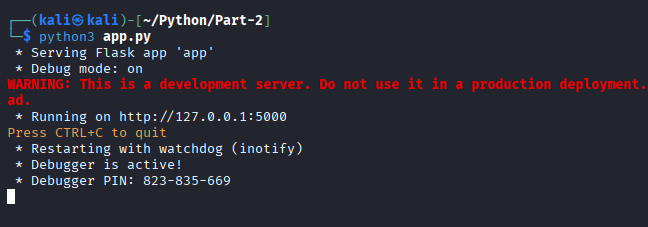
Now all the files have been set; it’s time to run it and have a look on the website!
python3 app.py
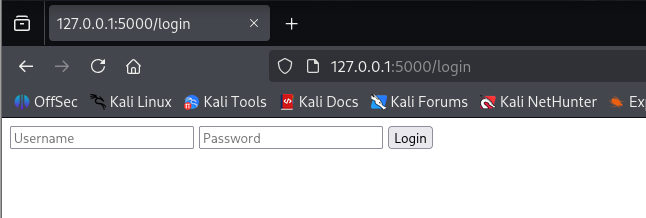
Navigate to 127.0.0.1:5000/login:
Building It Vulnerable on Purpose
Look again at this part of the login route in app.py:
if user is None:
    return "User not found"
elif user["password"] != password:
    return "Wrong password"
Vulnerability 1: User Enumeration
These two different messages look like helpful, clear error handling. In reality, they hand an attacker a way to check – with total certainty – whether any given username exists on your system, completely separately from whether they know the password.
An attacker doesn’t even need to try real passwords to exploit this. They just need:
- A wordlist of common usernames (
admin,test,support,husnain, etc.) - A way to send each one to
/loginwith any throwaway password - A way to sort the responses:
"Wrong password"confirms a real account, whereas"User not found"doesn’t.
That’s the entire attack: no cleverness required, just a script and a wordlist.
Vulnerability 2: No Rate Limiting
There’s currently nothing in our route stopping someone from submitting this form thousands of times per second. No delay, no lockout, no tracking of repeated attempts from the same source.
These two bugs are far more dangerous together than either is alone: enumeration hands the attacker a confirmed valid username, and no rate limiting means they can then throw an unlimited password wordlist at that exact account with zero resistance.
Testing Recon in Burp
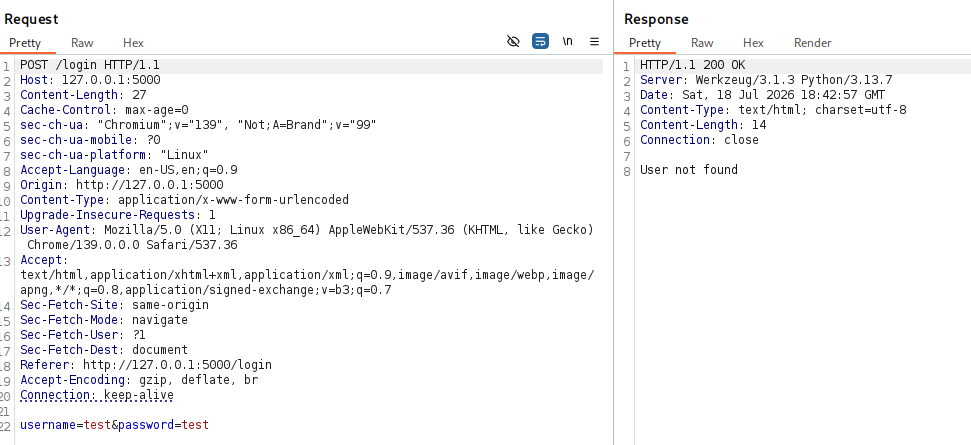
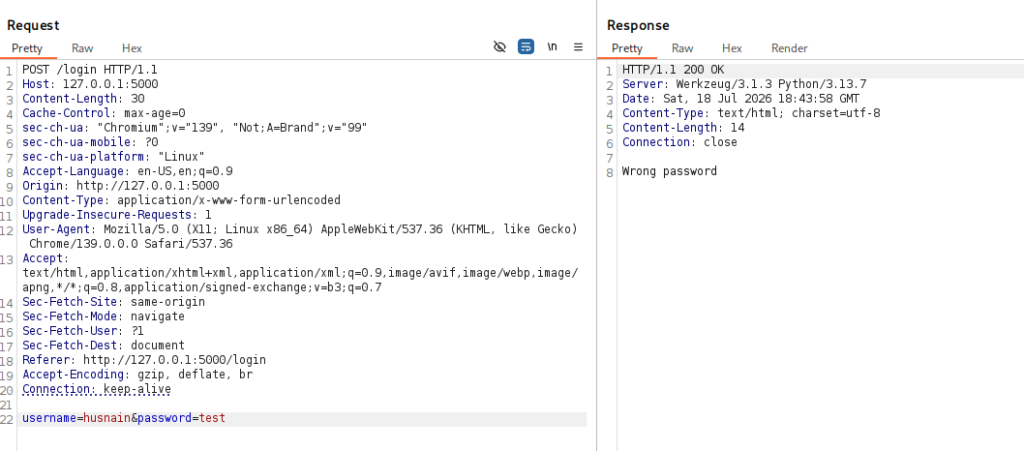
Step 1 – confirm enumeration manually. Send two login attempts through Burp Repeater — one with a username that doesn’t exist, one with a real username but the wrong password — and compare the response bodies side by side.
Incorrect Username:
Correct Username but wrong password:
Step 2 – brute-force the confirmed account. Take one confirmed username, move the payload position to password, load a small password wordlist, and run it. Because nothing is rate-limited, every single attempt goes through with no resistance, and the successful one stands out by a different response length or status code.
8. Fixing It
Fix 1 – Generic error messages
if user is None or user["password"] != password:
    return "Invalid username or password"
else:
    session["user_id"] = user["id"]
    return redirect(url_for("dashboard"))
Same logic, same database check – the only change is that both failure cases now return the exact same message. There’s nothing left for an attacker to sort by, because every failed attempt looks identical no matter what caused it.
Fix 2 – Per-account lockout
failed_attempts = {}

MAX_ATTEMPTS = 5
LOCKOUT_TIME = timedelta(minutes=15)

def is_locked_out(username):
    record = failed_attempts.get(username)
    if record and record["count"] >= MAX_ATTEMPTS:
        if datetime.now() < record["locked_until"]:
            return True
    return False

def record_failed_attempt(username):
    record = failed_attempts.get(username, {"count": 0, "locked_until": None})
    record["count"] += 1
    if record["count"] >= MAX_ATTEMPTS:
        record["locked_until"] = datetime.now() + LOCKOUT_TIME
    failed_attempts[username] = record
failed_attemptsis a plain Python dictionary mapping each username to how many times it’s failed and when its lockout (if any) expires. Worth being upfront: this resets every time the server restarts, since it’s just sitting in memory – in a real app this belongs in a database, not a dictionary. We’re keeping it simple here for learning purposes.is_locked_out(username)checks two things: has this username crossedMAX_ATTEMPTS, and if so, are we still inside thelocked_untilwindow? If the lockout time has already passed, this returnsFalseeven if the count is high, since the lockout has expired.record_failed_attempt(username)runs every time a login fails. It increments the count, and once that count hits the limit, it setslocked_untilto 15 minutes from right now.
Fix 3 – Per-IP rate limiting
Per-account lockout alone has a gap: an attacker can just try a different username on every single request to dodge it entirely. So we add a second layer, limiting by the requester’s IP address instead of by account:
from flask_limiter import Limiter
from flask_limiter.util import get_remote_address

limiter = Limiter(app=app, key_func=get_remote_address)

@app.route("/login", methods=["GET", "POST"])
@limiter.limit("5 per minute")
def login():
    ...
Limiteris the extension’s core object — it attaches to our Flaskappand does the actual request counting and blocking.get_remote_addresstellsLimiterto track and count requests based on the requester’s IP address.@limiter.limit("5 per minute")sits directly above the route and caps it at 5 requests per minute, per IP. Go over that, and Flask-Limiter automatically returns a429 Too Many Requestsresponse — we don’t have to write that logic ourselves.
With all three fixes in place: there’s no message difference to exploit, a single account locks itself after repeated failures, and even switching usernames to dodge that gets capped by IP shortly after.
Full, Complete Code
Everything above, assembled in the order it actually needs to run. This is what should go in your files.
app.py:
from flask import Flask, render_template, request, redirect, session, url_for
from flask_limiter import Limiter
from flask_limiter.util import get_remote_address
import sqlite3
from datetime import datetime, timedelta

app = Flask(__name__)
app.secret_key = "supersecretkey123"

limiter = Limiter(app=app, key_func=get_remote_address)

# ---------- Database setup ----------

def get_db():
    conn = sqlite3.connect("users.db")
    conn.row_factory = sqlite3.Row
    return conn

def init_db():
    conn = get_db()
    conn.execute("""
        CREATE TABLE IF NOT EXISTS users (
            id INTEGER PRIMARY KEY AUTOINCREMENT,
            username TEXT UNIQUE NOT NULL,
            password TEXT NOT NULL
        )
    """)
    conn.commit()
    conn.close()

def create_user(username, password):
    conn = get_db()
    conn.execute("INSERT INTO users (username, password) VALUES (?, ?)", (username, password))
    conn.commit()
    conn.close()

def create_default_user():
    conn = get_db()
    existing = conn.execute("SELECT * FROM users WHERE username = ?", ("husnain",)).fetchone()
    if existing is None:
        conn.execute("INSERT INTO users (username, password) VALUES (?, ?)", ("husnain", "test123"))
        conn.commit()
    conn.close()

# ---------- Rate limiting / lockout state ----------

failed_attempts = {}
MAX_ATTEMPTS = 5
LOCKOUT_TIME = timedelta(minutes=15)

def is_locked_out(username):
    record = failed_attempts.get(username)
    if record and record["count"] >= MAX_ATTEMPTS:
        if datetime.now() < record["locked_until"]:
            return True
    return False

def record_failed_attempt(username):
    record = failed_attempts.get(username, {"count": 0, "locked_until": None})
    record["count"] += 1
    if record["count"] >= MAX_ATTEMPTS:
        record["locked_until"] = datetime.now() + LOCKOUT_TIME
    failed_attempts[username] = record

# ---------- Routes ----------

@app.route("/login", methods=["GET", "POST"])
@limiter.limit("5 per minute")
def login():
    if request.method == "POST":
        username = request.form.get("username")
        password = request.form.get("password")

        if is_locked_out(username):
            return "Account temporarily locked. Try again later."

        conn = get_db()
        user = conn.execute("SELECT * FROM users WHERE username = ?", (username,)).fetchone()
        conn.close()

        if user is None or user["password"] != password:
            record_failed_attempt(username)
            return "Invalid username or password"

        session["user_id"] = user["id"]
        return redirect(url_for("dashboard"))

    return render_template("login.html")

@app.route("/dashboard")
def dashboard():
    if "user_id" not in session:
        return redirect(url_for("login"))
    return f"Welcome! You are logged in as user ID {session['user_id']}."

# ---------- Run ----------

if __name__ == "__main__":
    init_db()
    app.run(debug=True)
templates/login.html
<form method="POST" action="/login">
    <input type="text" name="username" placeholder="Username">
    <input type="password" name="password" placeholder="Password">
    <button type="submit">Login</button>
</form>
Before running it, install the one external dependency:
pip install flask-limiter
What We Fixed vs What’s Still Vulnerable
Fixed in this part
- User enumeration – both failure cases now return an identical message
- Unlimited brute-forcing – per-account lockout after 5 failed attempts, plus per-IP rate limiting as a second layer
Still vulnerable (carried into later parts)
- Passwords stored in plain text – no hashing yet, gets its own proper treatment separately
- Weak, hardcoded
secret_key– anyone with access to this source can forge valid session cookies - The session cookie itself is still fully stealable. Locking the login door does nothing for a session that’s already been issued; if an attacker grabs that cookie through XSS, they walk straight past this entire login system, no password needed
- No
HttpOnly,Secure, orSameSiteflags on the cookie – JavaScript can read it, it’ll travel over plain HTTP, and it isn’t restricted cross-site