
Content discovery is about finding things on a web server that aren’t meant to be publicly visible – hidden directories, sensitive files, old endpoints, subdomains, and misconfigured paths. This TryHackMe room walks through three approaches: manual, OSINT, and automated.
Task 2: Manual Discovery – Common Files
Before running any tool, check the standard files web servers expose by default. They give away a lot for free.

robots.txt
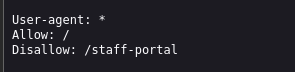
robots.txt tells search crawlers what not to index. For a pentester, it’s basically a shortlist of interesting paths.
Navigate to http://10.82.188.81/robots.txt:
sitemap.xml
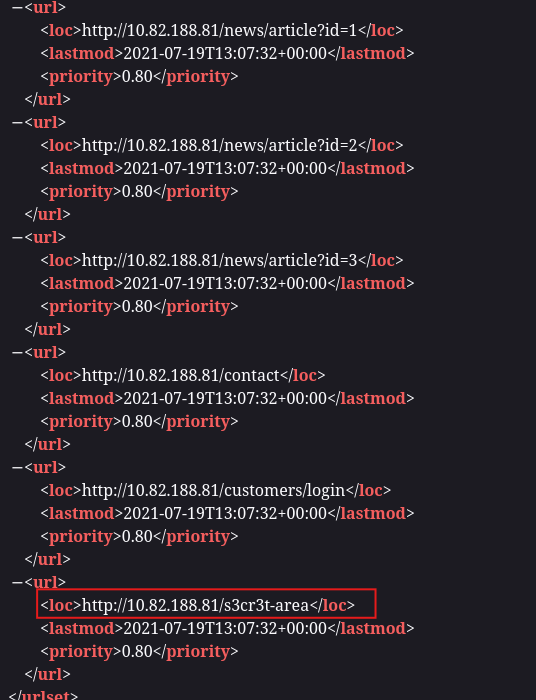
sitemap.xml tells crawlers what to index. It sometimes includes staging paths, old content, or sensitive endpoints that the dev forgot about.
Navigate to http://10.82.188.81/sitemap.xml. Among the standard pages (/news, /contact), one path stands out:
Task 3: Manual Discovery – Headers & Framework Stack
HTTP Headers
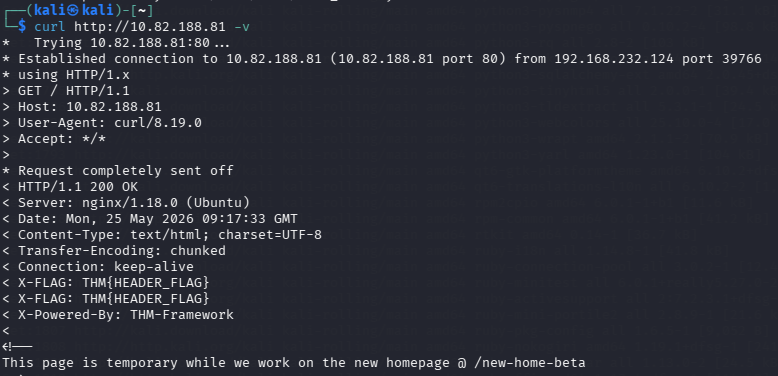
Response headers often leak server and framework info. Run:
curl http://10.82.188.81 -v
Framework Stack
The page source has a comment at the bottom with a link to the framework docs:

https://static-labs.tryhackme.cloud/sites/thm-web-framework
Check the documentation. It mentions:
Navigate to the
/thm-framework-loginpath on your website. Login withadmin/admin.
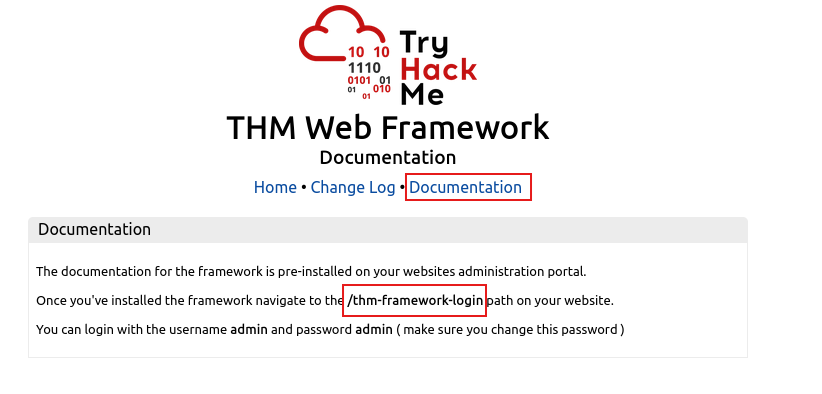
Hit http://10.82.188.81/thm-framework-login, log in with default creds, and grab the flag.
Task 4: OSINT – Search Engines & Web Tools
Google Dorking
Google advanced operators let you surface things that were accidentally indexed:
| Operator | Example | What it does |
|---|---|---|
site: | site:tryhackme.com | Limits to a specific domain |
inurl: | inurl:admin | Matches on URL content |
filetype: | filetype:pdf | Filters by file type |
intitle: | intitle:login | Matches page title |
Wappalyzer
Browser extension that fingerprints the tech stack of any site – CMS, framework, CDN, analytics, etc. Often shows version numbers too, which is useful when checking for known CVEs.
Task 5: OSINT – Repositories & Archives
Wayback Machine
Archives snapshots of websites going back to the late 90s. Useful for finding pages that were removed from live sites but never disappeared from the archive – old login forms, forgotten API endpoints, briefly published content.
GitHub
Developers sometimes push API keys, .env files, and credentials before realising a repo is public. Always check commit history, not just current files – sensitive data removed in a later commit still lives in the history.
S3 Buckets
Misconfigured public S3 buckets are a common finding.
Common naming patterns: {company}-assets, {company}-backup, {company}-dev.
Task 6: Automated Discovery – Gobuster Fundamentals
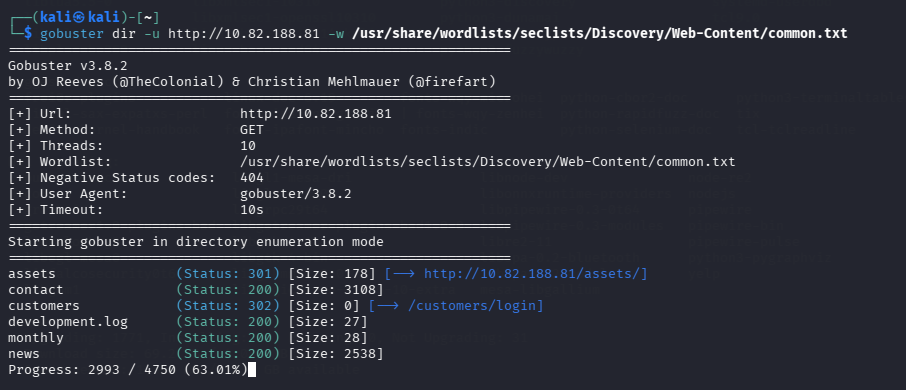
Manual recon only gets you so far. Gobuster automates directory and file brute-forcing using wordlists.
gobuster dir -u http://10.82.188.81 -w /usr/share/wordlists/seclists/Discovery/Web-Content/common.txt
Task 7: Automated Discovery – Subdomains & Virtual Hosts
DNS Mode
gobuster dns -d example.thm -w /usr/share/wordlists/seclists/Discovery/DNS/subdomains-top1million-5000.txt --wildcard
The -d flag is required for dns mode alongside -w.
Virtual Host Enumeration
Virtual hosts aren’t resolved via DNS – the web server uses the Host: header to decide which site to serve. Gobuster’s vhost mode cycles through wordlist entries as the Host header value.
First, add the domain to /etc/hosts:
10.82.188.81 acmeitsupport.thm
Then run:
bash
gobuster vhost -u "http://10.82.188.81" --domain acmeitsupport.thm \
  -w /usr/share/wordlists/seclists/Discovery/DNS/subdomains-top1million-5000.txt \
  --append-domain --exclude-length 250-320